Everything SMS gives you
- 01
See every text
Every send, refusal and reply, newest first, with its encoding (GSM-7 or UCS-2), segment count and the code found in it.
- 02
Delivery steps per number
Recipients decide what happens: delivered after 3 s, not delivered with a reason, never delivered, or a reply after a delay.
- 03
The person texts back
reply_sms_as_user sends Zenvia's MESSAGE webhook to the app. STOP-like words opt the number out; START opts it back in.
- 04
Opt-outs enforced
A send to an opted-out number gets 400 VALIDATION_ERROR, as Zenvia answers. Add or remove numbers by hand too.
- 05
Status callbacks on demand
Move a text to SENT, DELIVERED or NOT_DELIVERED with a reason, or send the same callback again to test duplicates.
- 06
Callbacks with your answers
Every MESSAGE_STATUS and MESSAGE callback is kept with the status your app returned; retry the ones it did not take.
- 07
Limits like the gateway
Over the throughput limit gets 429; over max segments gets 400 "message too long". Strict senders and templates refuse unknown ids.
- 08
Wait for the code
wait_for_sms blocks until the app texts a number and returns the OTP it found, so a sign-in test needs no phone.
The screens
Each number is a control or a reading on the real screen. Everything you can click there, your agent can do with a tool.
Every text, with what the app saw
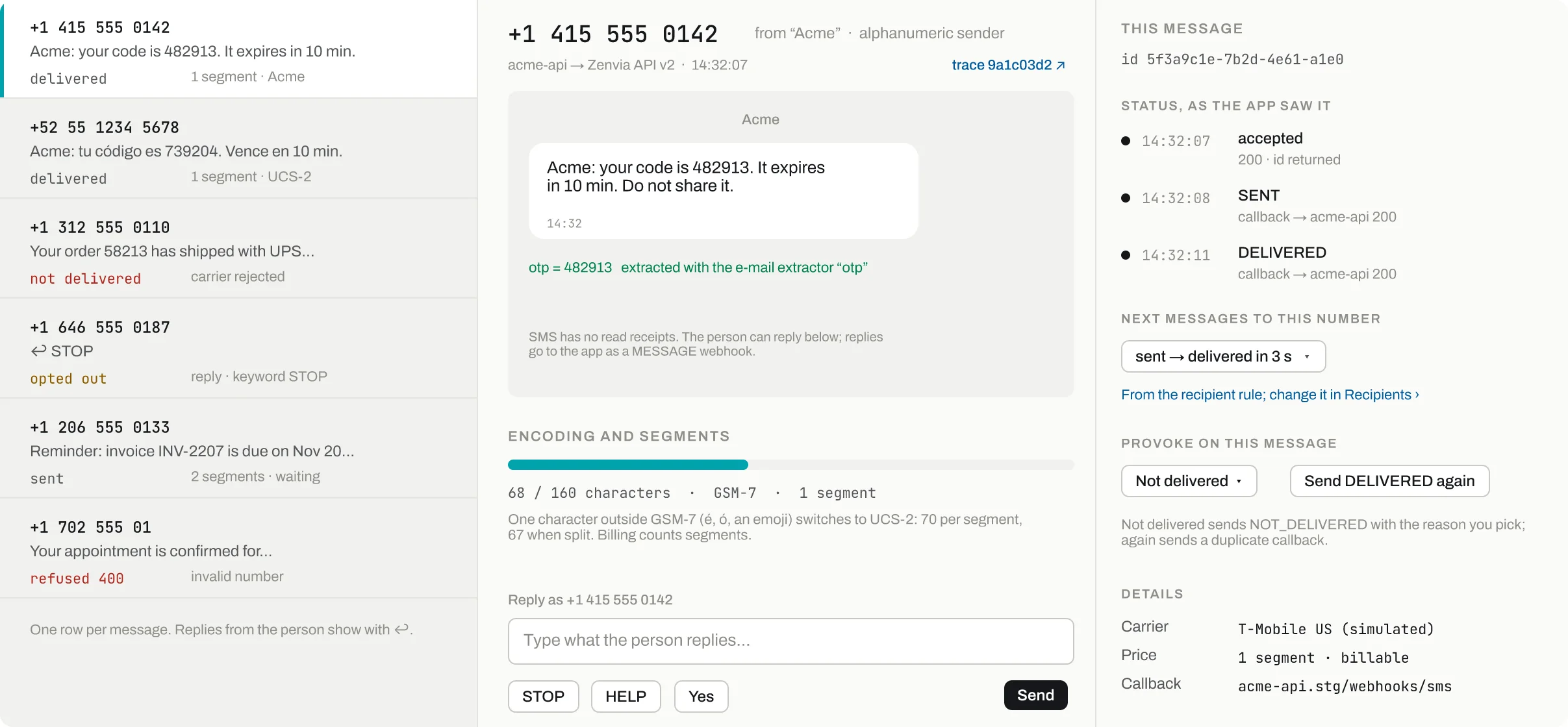
The person texted STOP; the next send to this number is refused 400, as Zenvia does.
The OTP is pulled out of the text; wait_for_sms returns it to the test.
GSM-7 or UCS-2, characters per segment and the segment count billing would use.
Accepted, SENT, DELIVERED: each callback with the status your app answered.
Not delivered with a reason, or the same DELIVERED callback again.
- Opted out
The person texted STOP; the next send to this number is refused 400, as Zenvia does.
- Code extracted
The OTP is pulled out of the text; wait_for_sms returns it to the test.
- Encoding and segments
GSM-7 or UCS-2, characters per segment and the segment count billing would use.
- Status, as the app saw it
Accepted, SENT, DELIVERED: each callback with the status your app answered.
- Provoke on this message
Not delivered with a reason, or the same DELIVERED callback again.
The simulated people behind numbers
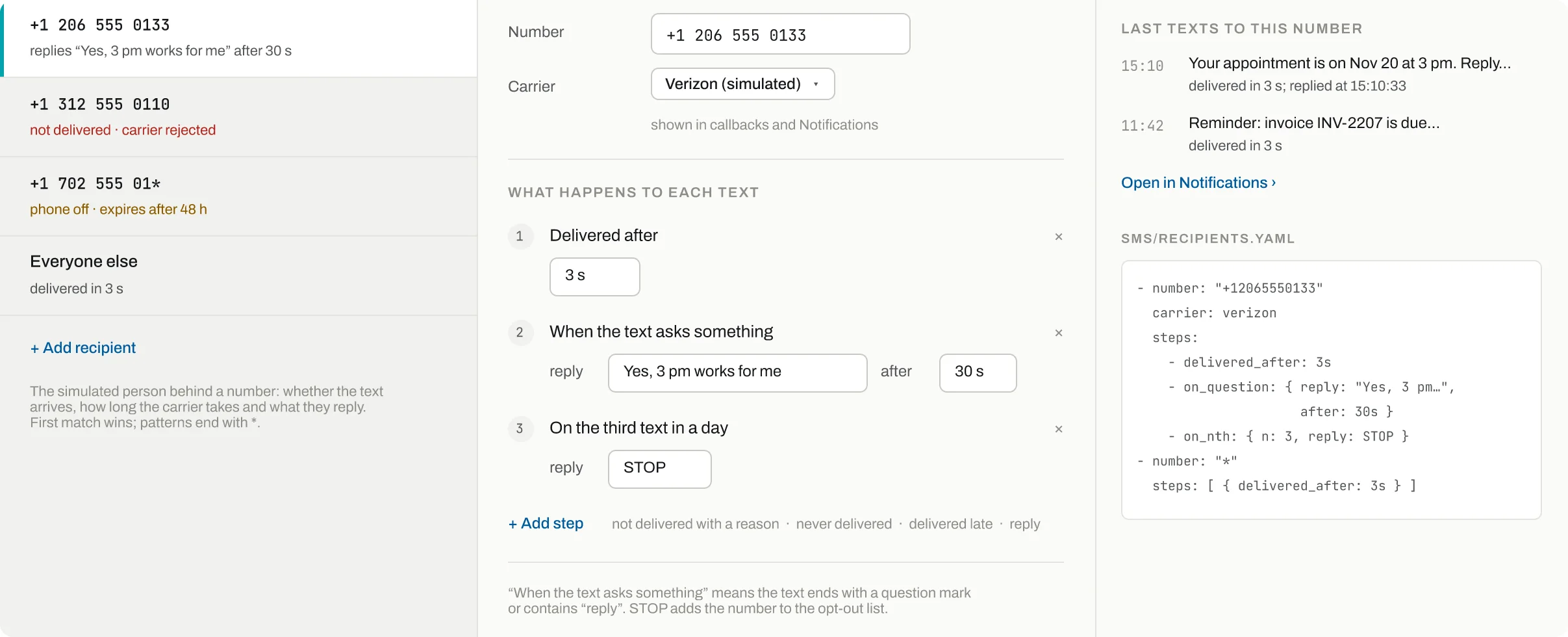
A number pattern with a trailing *: phone off, the text expires after 48 h.
Each text is delivered after the wait you set, and the status callback follows.
When the text asks something, the person replies with this text after 30 s.
On the third text in a day the person replies STOP and opts out.
Recipients live in sms/recipients.yaml; first match wins, * is everyone else.
- Pattern match
A number pattern with a trailing *: phone off, the text expires after 48 h.
- Delivered after
Each text is delivered after the wait you set, and the status callback follows.
- Answer a question
When the text asks something, the person replies with this text after 30 s.
- Nth text
On the third text in a day the person replies STOP and opts out.
- Saved as YAML
Recipients live in sms/recipients.yaml; first match wins, * is everyone else.
Senders, callbacks, opt-out and limits
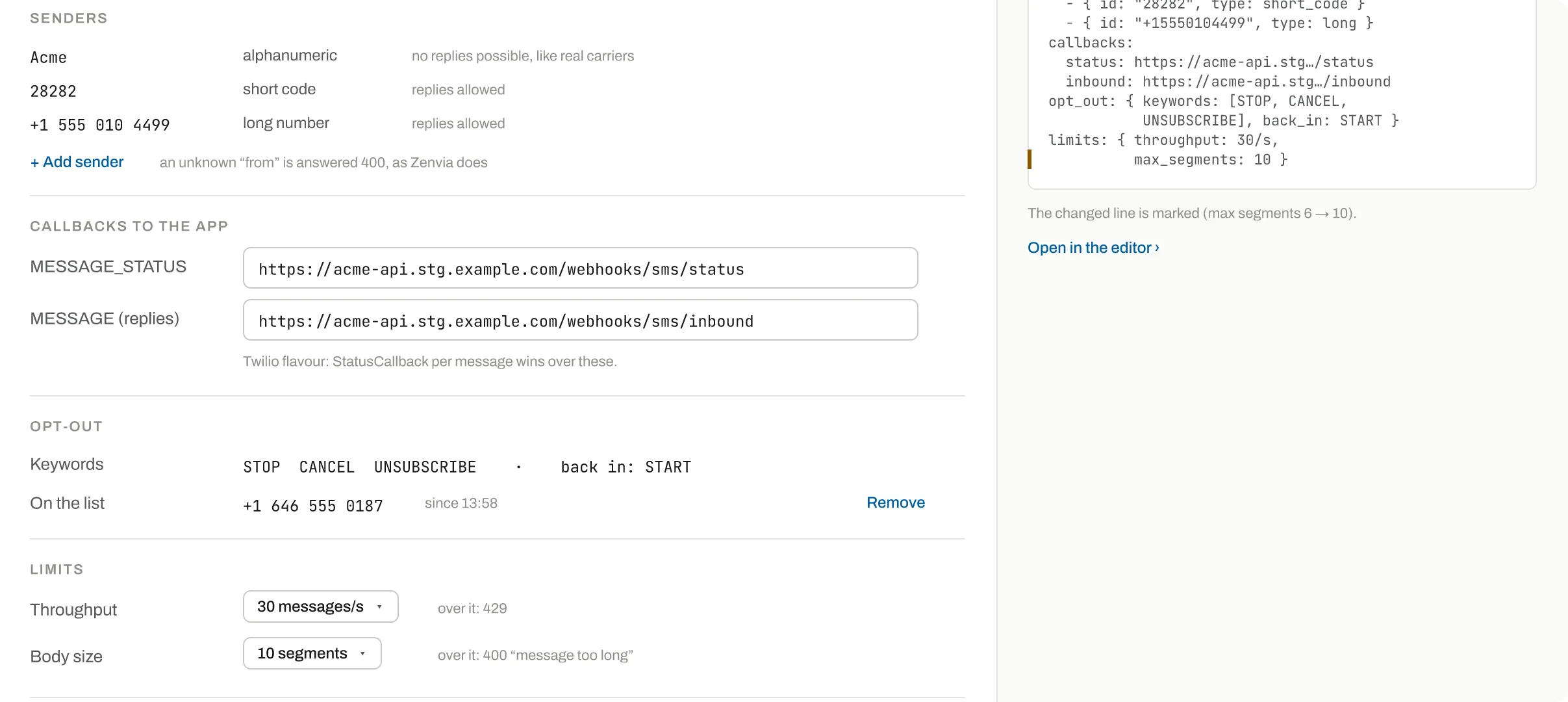
Alphanumeric, short code and long number; with strict_senders an unknown from gets 400.
Where MESSAGE_STATUS and MESSAGE (replies) are posted.
STOP, CANCEL, UNSUBSCRIBE opt out; START opts back in. Numbers on the list are shown.
Messages a second before the gateway answers 429.
More segments than this gets 400 "message too long".
- Senders
Alphanumeric, short code and long number; with strict_senders an unknown from gets 400.
- Callbacks to the app
Where MESSAGE_STATUS and MESSAGE (replies) are posted.
- Opt-out keywords
STOP, CANCEL, UNSUBSCRIBE opt out; START opts back in. Numbers on the list are shown.
- Throughput
Messages a second before the gateway answers 429.
- Body size
More segments than this gets 400 "message too long".
Break it on purpose
The failures you need to test, exactly when you ask: from the screen or by a tool call, each one shown on the timeline with who caused it.
500 on the next sendZenvia's INTERNAL_ERROR body; count sets how many sends fail
force_sms_failure {answer: 500}400 validation errorA VALIDATION_ERROR body, as Zenvia sends for bad input
force_sms_failure {answer: 400}Broken connectionThe connection resets, answers nothing, or hangs
force_sms_failure reset | empty | timeoutNot deliveredinvalid, carrier_rejected, phone_off, blocked or not_covered
set_sms_status NOT_DELIVEREDNever deliveredThe text stays SENT and expires after 48 h
set_sms_recipient steps never_deliveredDuplicate callbackThe same MESSAGE_STATUS arrives again
resend_sms_statusThe person texts STOPThe number opts out; the next send is refused 400
reply_sms_as_user {text: STOP}Rate limitSends over the messages-a-second limit get 429
set_sms_service limits.throughputMessage too longMore segments than allowed gets 400
set_sms_service limits.max_segments
Why not the real sandbox
No real phone needed
Codes, replies and STOPs happen on the screen or from a tool; nobody waits for a handset or pays for a text.
Failures on the next call
500, timeout or a carrier refusal comes exactly when the test asks, then stops by itself.
Callbacks you can replay
Resend or retry any status callback and see what your app answered, which a real gateway never shows.
Behaviour per number
Each number has its own steps: one delivers, one is switched off, one answers yes in 30 s.
Your AI agent drives it
Claude Code, Codex or any MCP client connects to /mcp (or calls /api over plain HTTP), sets the stand-in up, breaks it on cue and reads what your app did.
Check that our app stops texting a customer after they reply STOP.
MCP tools
list_smsEvery text both ways, with status history and the code foundwait_for_smsWait for the app to text a number; returns the OTPreply_sms_as_userThe person texts back; STOP opts outset_sms_statusMove a text to SENT, DELIVERED or NOT_DELIVEREDresend_sms_statusSend the same status callback againforce_sms_failureThe next sends fail: 500, 400, reset, empty, timeoutset_sms_recipientSteps for a number: delays, refusals, replieslist_sms_callbacksCallbacks sent to the app, with its answers
The same over HTTP
- GET
/api/sms/messages - GET
/api/sms/wait - POST
/api/sms/numbers/{number}/reply - POST
/api/sms/force - PUT
/api/sms/recipients
- Port 8025 serves SMS together with the screen, /api and /mcp.
- Settings live in sms/service.yaml and sms/recipients.yaml per environment.