Everything Mailboxes gives you
- 01
Put mail in
put_mail drops a message as if someone sent it: from, subject, text or HTML, attachments, or a whole raw RFC 822 message.
- 02
Real IMAP commands
SELECT, FETCH with BODYSTRUCTURE and sections, SEARCH, STORE, COPY, MOVE, EXPUNGE, IDLE and the UID commands.
- 03
POP3 too
STAT, LIST, UIDL, RETR, TOP and DELE over USER/PASS or AUTH PLAIN, with STLS.
- 04
See what the app did
Every command the app sent, with its time and without passwords, next to the messages it touched.
- 05
Folders and flags
INBOX first plus any folder; read and deleted flags show whether the app marked or removed what it read.
- 06
Logins like the real thing
LOGIN, AUTHENTICATE PLAIN and XOAUTH2 (any token); set a password per mailbox or let any password in.
- 07
Mailbox trouble on cue
A refused login, a mailbox in use, a connection dropped during FETCH, TLS required or an expired OAuth token.
The screens
Each number is a control or a reading on the real screen. Everything you can click there, your agent can do with a tool.
A mailbox the app reads
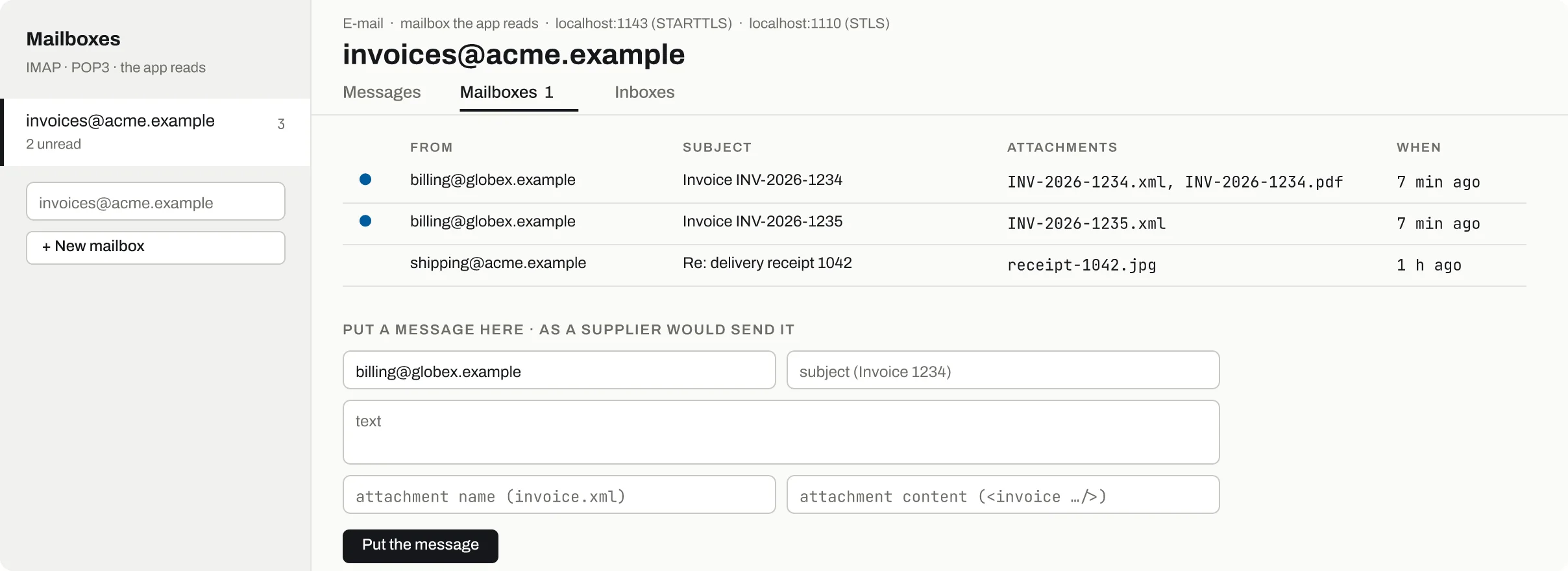
IMAP on 1143 with STARTTLS, POP3 on 1110 with STLS.
Each address is a login; the count shows unread messages.
The dot clears when the app sets \Seen; a PEEK fetch leaves it.
XML, PDF or images, as a supplier would attach them.
From, subject, text and an attachment; the app finds it on its next poll.
- Where to connect
IMAP on 1143 with STARTTLS, POP3 on 1110 with STLS.
- Mailboxes
Each address is a login; the count shows unread messages.
- Unread
The dot clears when the app sets \Seen; a PEEK fetch leaves it.
- Attachments
XML, PDF or images, as a supplier would attach them.
- Put the message
From, subject, text and an attachment; the app finds it on its next poll.
What the app did, and what to break
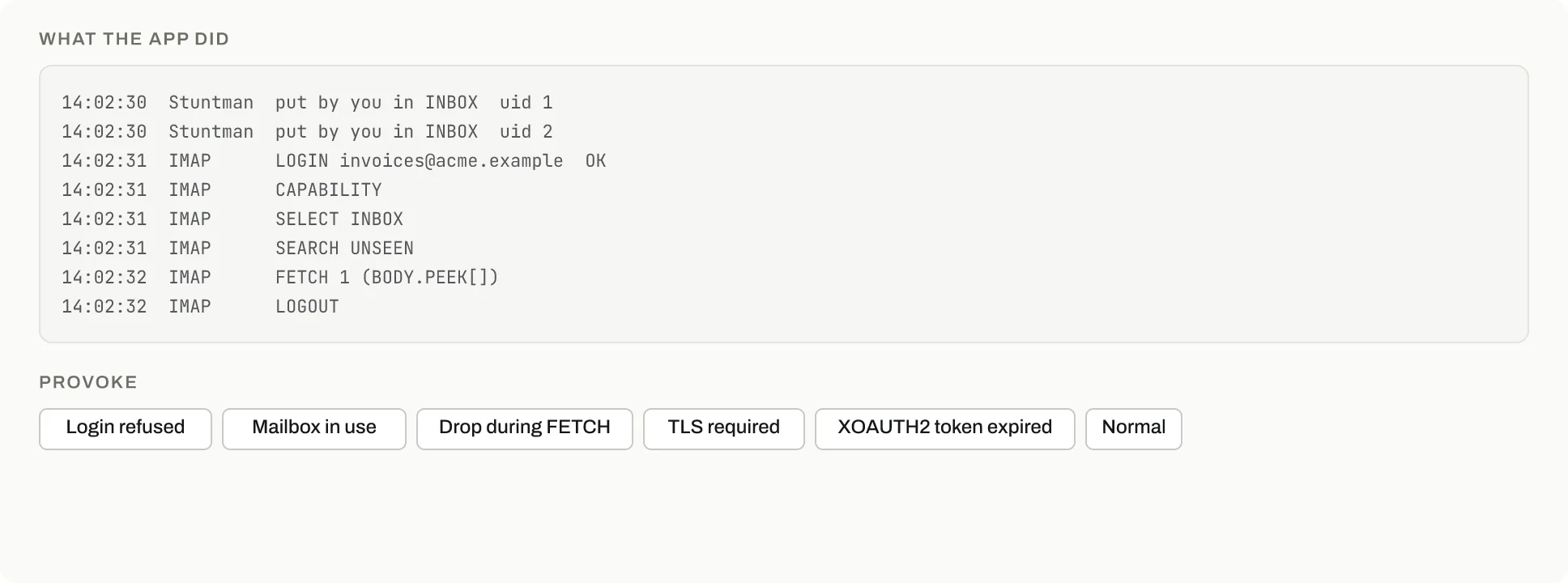
Messages you or an agent put in, with their UID.
Each command is logged; passwords never are.
BODY.PEEK[] leaves the message unread; the log shows which form the app used.
The connection closes mid-fetch: does the app retry without losing the message?
The OAuth login is refused, as when a refresh is due.
- Put by you
Messages you or an agent put in, with their UID.
- The app's login
Each command is logged; passwords never are.
- How it fetched
BODY.PEEK[] leaves the message unread; the log shows which form the app used.
- Drop during FETCH
The connection closes mid-fetch: does the app retry without losing the message?
- XOAUTH2 token expired
The OAuth login is refused, as when a refresh is due.
Break it on purpose
The failures you need to test, exactly when you ask: from the screen or by a tool call, each one shown on the timeline with who caused it.
Login refusedEvery login to the mailbox fails
set_mailbox {provoke: login_refused}Mailbox in useIMAP answers NO [INUSE]
set_mailbox {provoke: busy}Drop during fetchThe connection closes during FETCH or RETR
set_mailbox {provoke: drop_fetch}TLS requiredPlain logins are refused before STARTTLS or STLS
set_mailbox {provoke: tls_required}Token expiredXOAUTH2 logins are refused
set_mailbox {provoke: token_expired}Wrong passwordA login with the wrong password is refused
set_mailbox {password} or the password "wrong"
Why not the real sandbox
No shared test mailbox
Nobody else reads or deletes the messages, so a poller test sees exactly what you put in.
Messages in a second
put_mail lands at once; no waiting for a real server to deliver and index.
Watch the conversation
The command log shows whether the app used SEARCH UNSEEN, PEEK or EXPUNGE, which a real server keeps to itself.
Failures servers rarely give
Drops during FETCH, INUSE and expired XOAUTH2 tokens come when you ask, to test retries.
Your AI agent drives it
Claude Code, Codex or any MCP client connects to /mcp (or calls /api over plain HTTP), sets the stand-in up, breaks it on cue and reads what your app did.
Check that our invoice importer picks up an XML attached to an e-mail.
MCP tools
list_mailboxesMailboxes with messages, unread counts and how to connectset_mailboxCreate or change a mailbox: password and provocationput_mailPut a message in as if someone sent itlist_mailbox_messagesMessages, flags and the app's commandsget_environmentThe environment's addresses and settingsreset_environmentEvery service back to its seeds before a test
The same over HTTP
- GET
/api/mailboxes - PUT
/api/mailboxes/{address} - POST
/api/mailboxes/{address}/messages - GET
/api/mailboxes/{address}/messages
- One port serves every environment: logins go to the default one.
- STARTTLS and STLS use the same self-signed certificate as SMTP.