Everything Webhook inboxes gives you
- 01
Every delivery kept
Headers, body, signature check, the answer given and every attempt of the same event, newest first.
- 02
Answer as you choose
Always 200, accept with 202, always an error, fail N times then succeed, fail a share, hang, reset or an empty reply.
- 03
Retries per event
fail_then counts per event id or per inbox, so each event fails 3 times and the attempts show the app's backoff.
- 04
Delays and hangs
Add a delay before answering, or hold the request: 35 s tests a 30 s client timeout.
- 05
Signature checks
t-v1-hmac-sha256, hmac-sha256-hex or hmac-sha256-base64, with a timestamp tolerance and a replay check on the event id.
- 06
Secret rotation
Set previous_secret: a delivery signed with the old secret is marked as such. reject_bad answers 401 like a strict customer.
- 07
Traps for the client
A redirect to a private address (SSRF), a 50 MB answer, or one byte a second: each recorded as passed or failed.
- 08
Ephemeral inboxes
A test or an agent makes an inbox that expires by itself (1 h by default); kept ones live in webhooks/inboxes.yaml.
The screens
Each number is a control or a reading on the real screen. Everything you can click there, your agent can do with a tool.
Deliveries and their checks
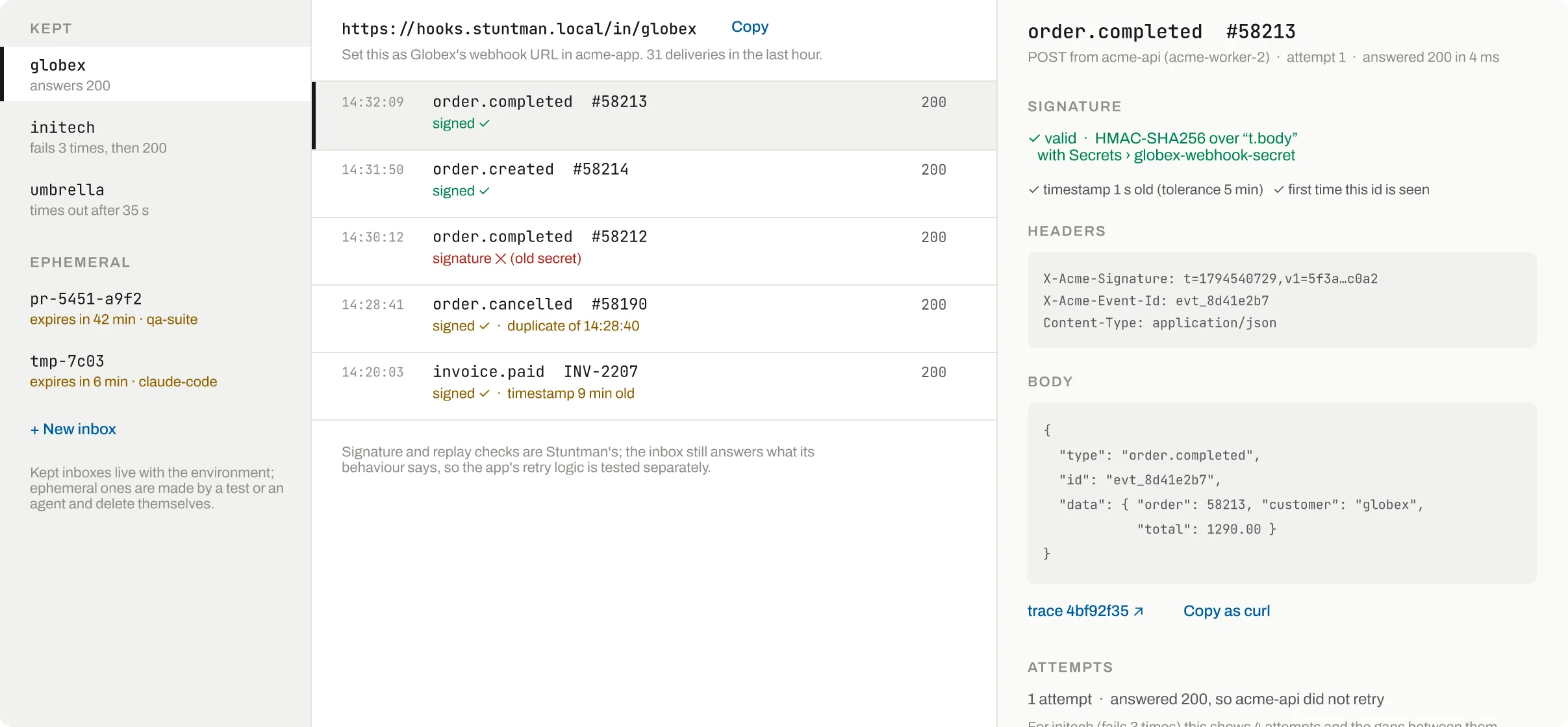
Made by a test or an agent; each shows when it expires and who made it.
Signed with the previous secret: the app is still using it after rotation.
The same event id seen before: the app sent it twice.
Signed, but the timestamp is outside the tolerance (5 min by default).
Which scheme, which secret, the timestamp age and whether the id is new.
- Ephemeral inboxes
Made by a test or an agent; each shows when it expires and who made it.
- Old secret
Signed with the previous secret: the app is still using it after rotation.
- Duplicate
The same event id seen before: the app sent it twice.
- Old timestamp
Signed, but the timestamp is outside the tolerance (5 min by default).
- Signature
Which scheme, which secret, the timestamp age and whether the id is new.
How an inbox answers
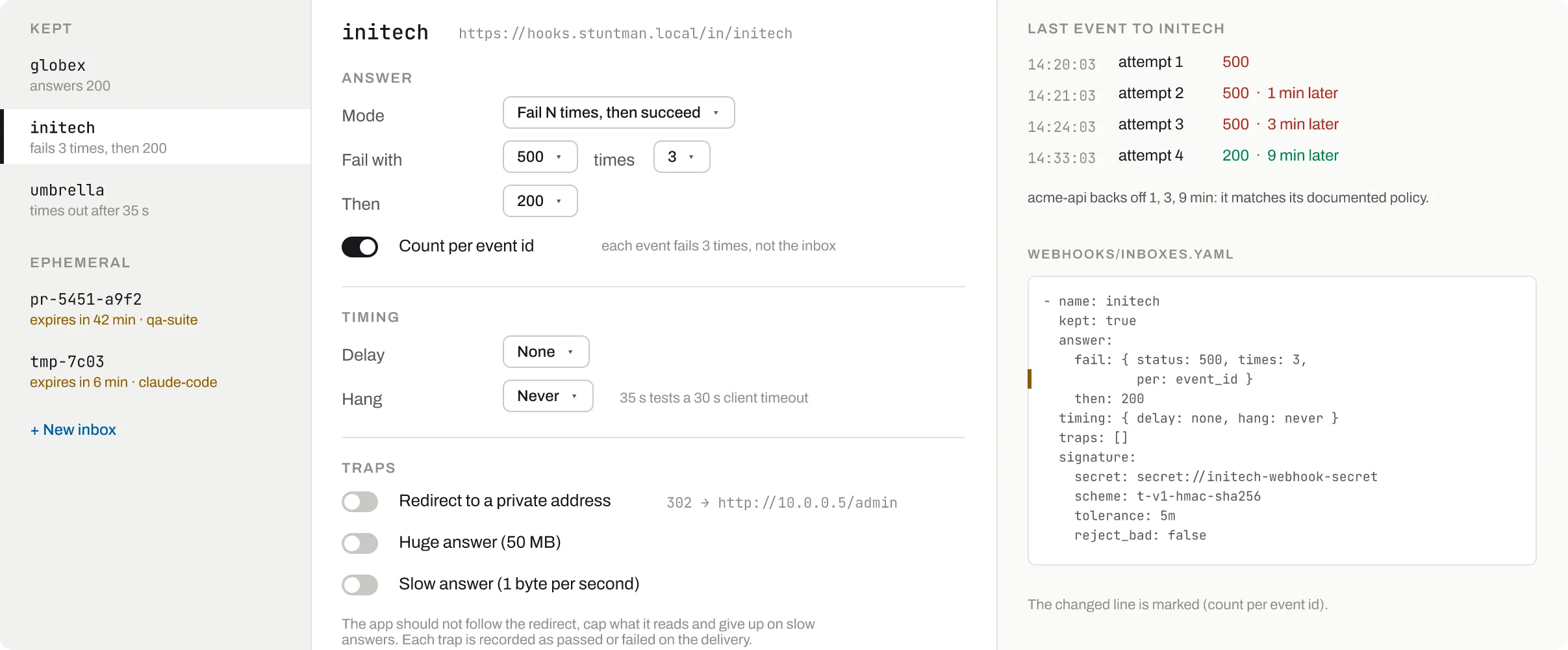
Fail N times then succeed; also always 200, 202, error, a share, hang, reset or empty.
Each event fails 3 times, not the inbox as a whole.
Hold the request: 35 s tests a client that gives up at 30 s.
Private redirect, huge answer, slow answer: the app should not follow, should cap and give up.
Each attempt of the last event and the gap before it: the app's backoff, measured.
- Mode
Fail N times then succeed; also always 200, 202, error, a share, hang, reset or empty.
- Count per event id
Each event fails 3 times, not the inbox as a whole.
- Hang
Hold the request: 35 s tests a client that gives up at 30 s.
- Traps
Private redirect, huge answer, slow answer: the app should not follow, should cap and give up.
- Attempts
Each attempt of the last event and the gap before it: the app's backoff, measured.
Break it on purpose
The failures you need to test, exactly when you ask: from the screen or by a tool call, each one shown on the timeline with who caused it.
Fail then succeedEach event gets 500 three times, then 200
set_inbox mode fail_then, times 3Fail a shareA percentage of deliveries fail
set_inbox mode fail_share, share 50Always an errorEvery delivery gets the status you pick
set_inbox mode error, status 503HangNo answer until the app gives up
set_inbox mode hangResetThe connection is reset
set_inbox mode resetEmpty replyThe connection closes without a byte
set_inbox mode emptySlow answerA delay before every answer
set_inbox delayPrivate redirect302 to a loopback address: does the app follow?
set_inbox traps redirect_privateHuge answerA 50 MB body: does the app stop reading?
set_inbox traps hugeOne byte a secondDoes the app give up on a slow answer?
set_inbox traps slowStrict customerBad signatures get 401
set_inbox reject_bad trueInbox goneLater deliveries get 410 Gone
remove_inbox
Why not the real sandbox
Retries you can measure
Request bins show the request; here every attempt of an event is grouped, so the backoff is visible.
Failures beyond 500
Hangs, resets, empty replies and traps need a real socket; the inbox has its own port for that.
Signatures checked for you
Scheme, secret, rotation, timestamp and replay are checked on every delivery, not by hand.
Nothing left behind
Ephemeral inboxes delete themselves, so parallel tests and agents never share a URL.
Your AI agent drives it
Claude Code, Codex or any MCP client connects to /mcp (or calls /api over plain HTTP), sets the stand-in up, breaks it on cue and reads what your app did.
Check that the app retries an order.completed webhook three times with backoff and signs it correctly.
MCP tools
create_webhook_inboxAn inbox, ephemeral by defaultset_inboxHow it answers, traps and signature settingslist_webhook_inboxesKept and ephemeral inboxes with their URLget_webhook_inboxBehaviour, signature and the last event's attemptslist_deliveriesDeliveries with signature result and answerget_deliveryHeaders, body, checks and all attemptswait_for_deliveryWait until a delivery is answeredremove_inboxRemove an inbox; later deliveries get 410
The same over HTTP
- POST
/api/webhooks/inboxes - PUT
/api/webhooks/inboxes/{name} - GET
/api/webhooks/deliveries - GET
/api/webhooks/deliveries/wait - DELETE
/api/webhooks/inboxes/{name}
- A removed inbox keeps its history for 24 h.