Everything Files gives you
- 01
Three protocols, one folder
Each server is a folder: FTP, explicit FTPS and SFTP all see the same files, so the app can switch protocol without new fixtures.
- 02
The commands EDI clients use
PASV, EPSV, LIST, NLST, MLSD, RETR, STOR, APPE, DELE, MKD, RMD, RNFR/RNTO, SIZE, MDTM and REST.
- 03
Drop a partner's file
put_file puts text or binary on a server; the app finds it on its next poll, exactly as if the partner sent it.
- 04
Wait for the app's upload
wait_for_file blocks until a file whose path matches a * pattern appears, then returns it.
- 05
Users and read-only logins
Each server has its own users; read_only users get permission denied on writes, as a real partner account would.
- 06
Every login and transfer
list_transfers shows logins, uploads, downloads, deletes and listings, newest first, with the provoked ones marked.
- 07
A stable host key
The SFTP host key is kept on disk, so a client that pinned it keeps trusting it across restarts.
- 08
Failures on the next session
Refuse logins, fill the disk, deny permission, cut a transfer after 4 KB, slow to 20 KB/s or change the host key.
The screens
Each number is a control or a reading on the real screen. Everything you can click there, your agent can do with a tool.
A server, its folders and the next sessions
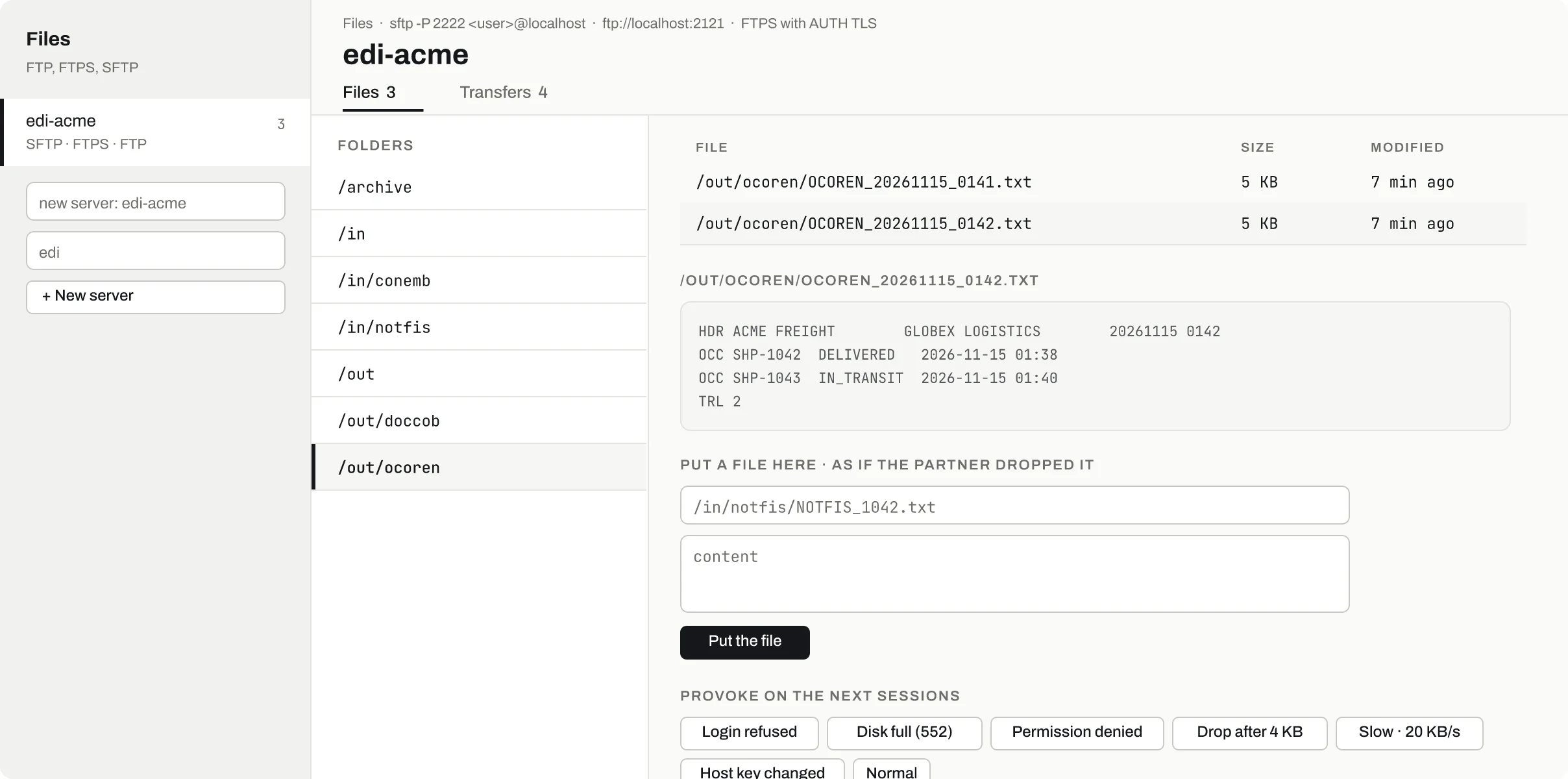
SFTP on :2222, FTP on :2121 and FTPS with AUTH TLS, all on the same server.
Folders made by set_file_server, such as /in for the app and /out for the partner.
A file's content as text; get_file returns base64 for binary.
Drop a file as if the partner did; the app picks it up on its next poll.
Login refused (530), disk full (552), permission denied (550), drop after 4 KB, slow, host key changed.
- How to connect
SFTP on :2222, FTP on :2121 and FTPS with AUTH TLS, all on the same server.
- Folders
Folders made by set_file_server, such as /in for the app and /out for the partner.
- What the app uploaded
A file's content as text; get_file returns base64 for binary.
- Put a file
Drop a file as if the partner did; the app picks it up on its next poll.
- Provoke
Login refused (530), disk full (552), permission denied (550), drop after 4 KB, slow, host key changed.
Logins and transfers, in order
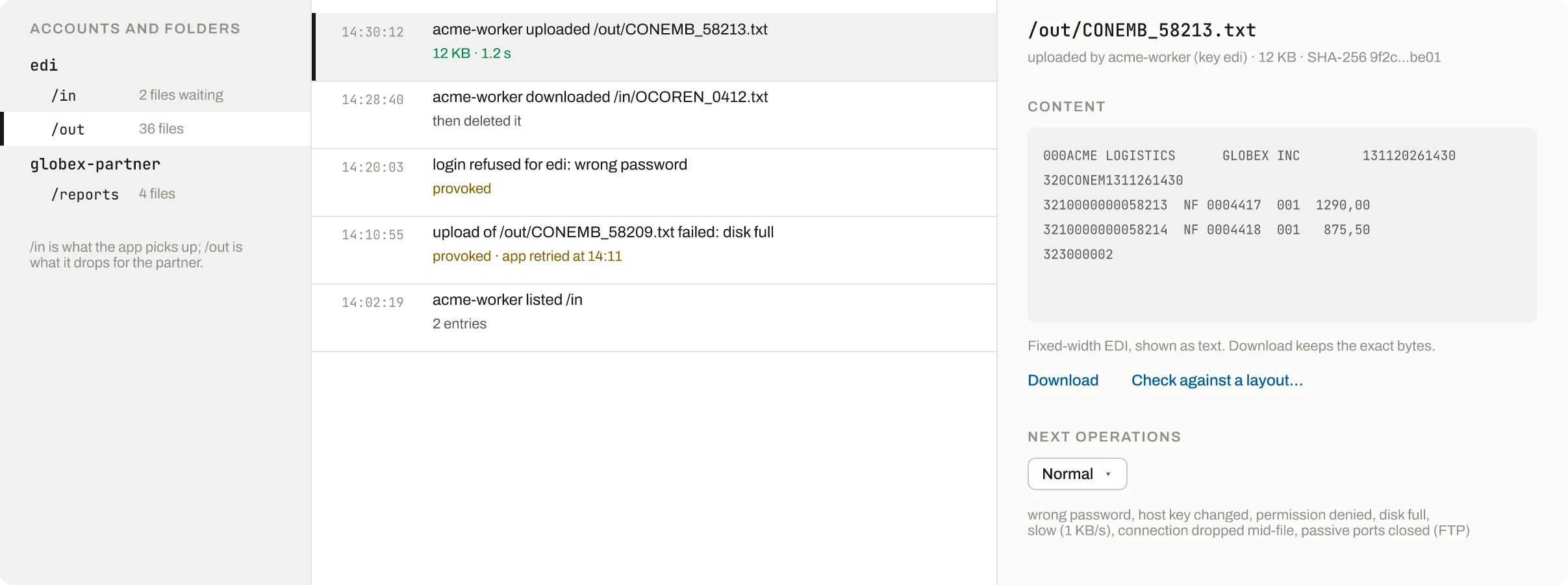
Each user with its folders: files waiting in /in, files the app wrote to /out.
Who uploaded, which path, size and how long it took.
A provoked login_refused is marked on the row, so it is not taken for a real bug.
A provoked disk full is marked on the row, next to what the app did after it.
Fixed-width EDI shown as text; the exact bytes are kept.
- Users and folders
Each user with its folders: files waiting in /in, files the app wrote to /out.
- An upload
Who uploaded, which path, size and how long it took.
- Refused login
A provoked login_refused is marked on the row, so it is not taken for a real bug.
- Did the app retry?
A provoked disk full is marked on the row, next to what the app did after it.
- The file itself
Fixed-width EDI shown as text; the exact bytes are kept.
Break it on purpose
The failures you need to test, exactly when you ask: from the screen or by a tool call, each one shown on the timeline with who caused it.
Login refusedEvery login answers 530
set_file_server provoke login_refusedDisk fullUploads answer 552
set_file_server provoke disk_fullPermission deniedWrites answer 550
set_file_server provoke permission_deniedTransfer cutThe connection breaks after 4 KB
set_file_server provoke drop_midSlow linkTransfers run at 20 KB/s
set_file_server provoke slowHost key changedSFTP shows another host key; pinned clients refuse
set_file_server provoke host_key_changedRead-only partnerA user that can read but gets permission denied on writes
set_file_server users with read_onlyWrong passwordUsers with no password take any password except wrong
log in with password wrong
Why not the real sandbox
No partner to call
Real partner servers are shared, slow to change and never fail on request. Here you make the file appear, or the disk fill, now.
Proof of what was sent
Every upload is kept and listed, so a test asserts the exact file the app wrote, not just that it connected.
Three protocols for free
FTP, FTPS and SFTP from one process and one folder, with no SSH daemon or vsftpd to configure.
Failures that end
A provocation lasts until you set none, and every provoked session is marked in the transfer list.
Your AI agent drives it
Claude Code, Codex or any MCP client connects to /mcp (or calls /api over plain HTTP), sets the stand-in up, breaks it on cue and reads what your app did.
Drop an orders file on the EDI server, then check that the app answers with a file in /out.
MCP tools
list_file_serversServers with users, provocation, how to connect, file countsset_file_serverCreate or change a server: users, folders, provokelist_filesFiles and folders on a server or under a pathget_fileA file's content (text or base64)put_fileDrop a file as the partner woulddelete_fileDelete a file from a serverlist_transfersLogins and transfers, newest firstwait_for_fileWait for a file matching a pattern
The same over HTTP
- PUT
/api/files/servers/{name} - POST
/api/files/servers/{server}/put - GET
/api/files/servers/{server}/wait - GET
/api/files/servers/{server}/file - GET
/api/files/transfers
- One port serves every environment: logins go to the default one.
- In Docker, FTP passive data uses ports 30000-30009.